AI agent support
ODE is offline-first for data collection: field work never depends on a network, let alone on AI. For data analysis and form authoring, ODE treats AI agents as first-class users. An assistant in your editor, such as Zed, VS Code, Positron, Claude, or Cursor, can explain your forms, prepare data for analysis, and help change forms and custom apps. The person in charge of the project stays in control of what the agent can see and do.
All of this runs through ODE Desktop on your own computer. ODE Desktop doesn't send anything to an AI service itself. Your AI tool runs the local ode command, and only the results of those commands are visible to it.
What agents can do
| Task | Example request | Needs |
|---|---|---|
| Describe a project, form, or question | "What does the household form ask, and when is the bed-net question shown?" | Nothing extra (on by default) |
| Validate form edits | "Check my changes to my_first_form." | Nothing; works on files |
| Analyze data | "Export the census data and tabulate net use by region in R." | Allow agent access to data and attachments |
| Change forms and preview them | "Add a question about mosquito nets, shown only if the household consents." | Allow agents to manage the app bundle |
| Publish to devices | "Publish the new form version." | Allow agents to push the app bundle to Synkronus, plus your explicit confirmation |
| Start a new project | "Set up a new ODE project called Malaria survey 2027." | Nothing (creates a separate local profile) |
Agents follow built-in step-by-step guides (skills) for these tasks:
ode-describe-app,ode-describe-form,ode-describe-question;ode-analyze-export;ode-edit-form;ode-new-project.
Setting up your AI tool
On the Profiles page in ODE Desktop, the Local tools section has two buttons:
- Copy initial prompt for AI assistant: paste it into a chat. It tells the assistant how to reach this profile and what it may do.
- Copy MCP server config: for tools that support the Model Context Protocol. Add it to your tool's MCP settings. Every ODE command then shows up as a tool, without any prompt.
| Tool | Where to put the MCP config |
|---|---|
| Claude Desktop, Cursor | mcpServers in the tool's MCP settings (copy as-is) |
| Zed | context_servers in settings, with the same command and args |
| VS Code | servers in .vscode/mcp.json, with the same command and args |
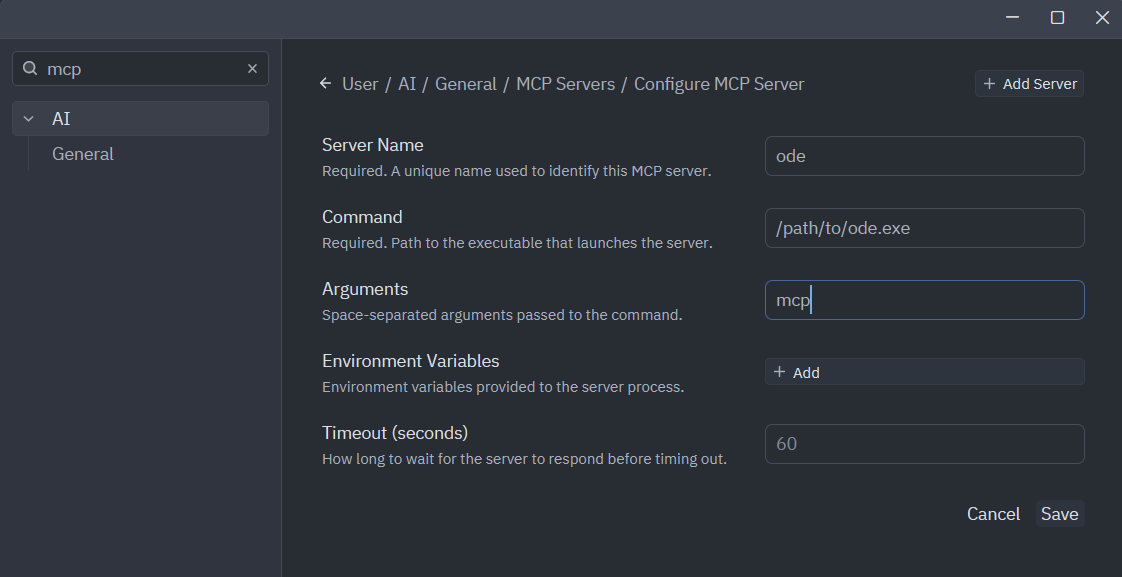
- In Zed, press Ctrl+, to open Settings and search for mcp.
- Open MCP Servers, select Add Server, and enter:
- Server Name:
ode - Command: the full path to your
odeexecutable - Arguments:
mcp
- Server Name:
- Select Save. If ODE's tools do not appear immediately, restart Zed.
Use Copy MCP server config in ODE Desktop to get the correct executable path for your installation. The /path/to/ode.exe value below is only an example.
Analysis scripts generated by ODE Desktop also point agents to these tools. That covers the load snippets on the Export page and in every export folder.
Permissions: you decide
Each profile has its own Local tools settings in ODE Desktop → Profiles:
| Setting | Default | Allows |
|---|---|---|
| Available to local tools | On | Listing the profile and reading form definitions |
| Allow agent access to data and attachments | Off | Exporting collected responses and attachments |
| Allow agents to manage the app bundle (developer mode) | Off | Switching developer mode, validating, and preparing a publish |
| Allow agents to push the app bundle to Synkronus | Off | Publishing new app versions to the server |
- Enforced by ODE, not by the AI: the settings are checked by ODE itself, not by asking the AI to behave. No command-line option can override them.
- Changes apply immediately: turning a setting off takes effect on the agent's next call.
- Credentials stay private: passwords and tokens are never given to agents. Publishing uses the credentials saved in ODE Desktop without revealing them.
- Live projects: for profiles connected to a real deployment, leave manage and push off unless you're actively working with an agent on that project. To hide a profile from agents completely, turn off Available to local tools.
Data protection
Collected data usually describes real people. Before you allow data access, keep in mind:
- Data may leave your device: if your AI tool uses a remote model, the data the agent reads may be sent to that provider. Check your organisation's rules and the provider's terms first.
- Exports aren't anonymised: an export contains the data as collected. Give agents access only to what the task needs, and prefer asking for summaries over individual records.
- Exports are self-describing:
export_manifest.jsonlists every question, its labels, coded answers, and skip logic. An agent can often answer questions about structure from the manifest alone, without reading records.
Reference
- Form specifications and Form design: what agents edit.
- ODE Desktop developer mode: how edits are previewed.
- Command reference (
ode --help): every command prints JSON, and all errors name the missing permission or the next step. - custom_app template: the starting point for new projects.